Reproducible Data Science with R III

R Packages Essentials

Adrian A. Correndo

2025-11-28

What is an R Package? ๐Ÿ“ฆ

Whatโ€™s a Package? ๐Ÿ“ฆ

  • An R package is a collection of R functions, data, and documentation organized in a standardized format.

Key Components of an R Package

  1. Functions: Reusable R code that performs specific tasks.
  2. Data: Example datasets to illustrate package functions or concepts.
  3. Documentation: Help files and vignettes explaining how to use the package.
  4. Namespace: Defines which functions are available to the user.

Tip

  • Pro Tip: Packages help simplify code reuse and make complex tasks more accessible.

Why packages? ๐Ÿš€

Benefits of Using R Packages ๐Ÿ’ก

  • Efficiency: Avoid rewriting code for common tasks.
  • Consistency: Standardized code structure and naming conventions.
  • Reproducibility: Ensures your work is easier to share and reproduce.

Example 1: mutate()

Packages like dplyr simplify tasks by providing clean, concise code for data manipulation.

1. Create a new column: total, which is the sum of two existing columns (var1 and var2).

Example 1: mutate()

Base R version

# Sample data
df <- data.frame(var1 = c(1, 2, 3), var2 = c(4, 5, 6))

# Adding a new column using base R
df$total <- df$var1 + df$var2


dplyr package (Tidyverse)

library(dplyr)

# Using mutate to add a new column
df <- df %>%
  mutate(total = var1 + var2)

Example 2: filter()

2. Filtering: get values of var1 greater than 2.

Base R version

# Filter rows using base R
filtered_df <- df[df$var1 > 2, ]


dplyr package (Tidyverse)

# Filter rows using dplyr
filtered_df <- filter(data = df, var1 > 2)

Example 3: select()

3. Select specific variables: get var1 and var3.


Base R version

# Select columns using base R
selected_df <- df[ , c("var1","var3")]


dplyr package (Tidyverse)

# Filter rows using dplyr
filtered_df <- select(data = df, var1, var3)

Example 4: iteration

Scenario: You have a data frame with a column study and a column data, where data contains nested data frames for each study.
We want to fit a linear model to each nested data frame (predicting y by x) and store the models in a new column called model.

Dataset

# Sample data frame with nested data
df <- tibble(
study = c("Study 1", "Study 2"),
data = list(data.frame(x = 1:10, y = rnorm(10)), 
            data.frame(x = 1:10, y = rnorm(10))  ) )

Example 4: iteration

Base R version (for loop)

# Initialize an empty list to store models
models <- vector("list", length = nrow(df))

# Using a for loop to fit the model and store results
for (i in seq_len(nrow(df))) {
  models[[i]] <- lm(y ~ x, data = df$data[[i]])
}

# Add the list of models as a new column in the data frame
df$model <- models


purrr package (map() function)

library(purrr)
# Using map to fit the model for each nested data frame
df <- df %>%
  mutate(model = map(data, ~ lm(y ~ x, data = .x)))

Where do packages come from โ“

Where do packages come from โ“

Why is the source important? ๐Ÿ“Œ

  • Understand the benefits and drawbacks of stable vs. development versions.
  • Understand the security standards and risks associated.
  • Learn when to choose each source for your projects.

CRAN: Comprehensive R Archive Network ๐Ÿ—‚๏ธ

The primary repository for R packages, stability and rigor.

Pros ๐ŸŒŸ

  • High stability and compatibility across systems
  • Strict quality standards and documentation requirements
  • Easy installation and dependency management

Cons โš ๏ธ

  • Slower update cycles due to strict review processes
  • Limited flexibility for experimental or niche packages

CRAN: Comprehensive R Archive Network ๐Ÿ—‚๏ธ

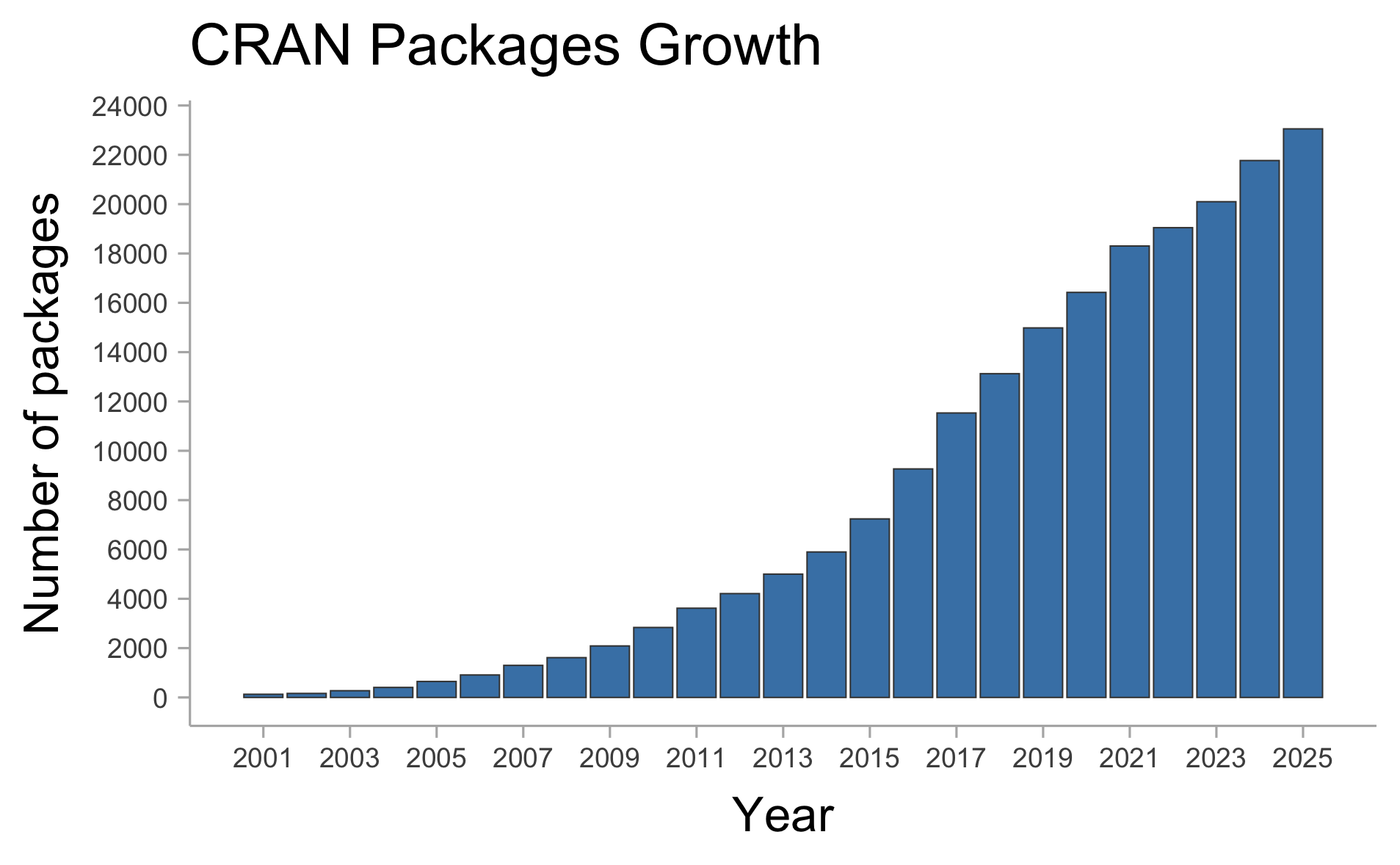
There are currently +23,000 of packages (on CRAN only).
CRAN Taskviews

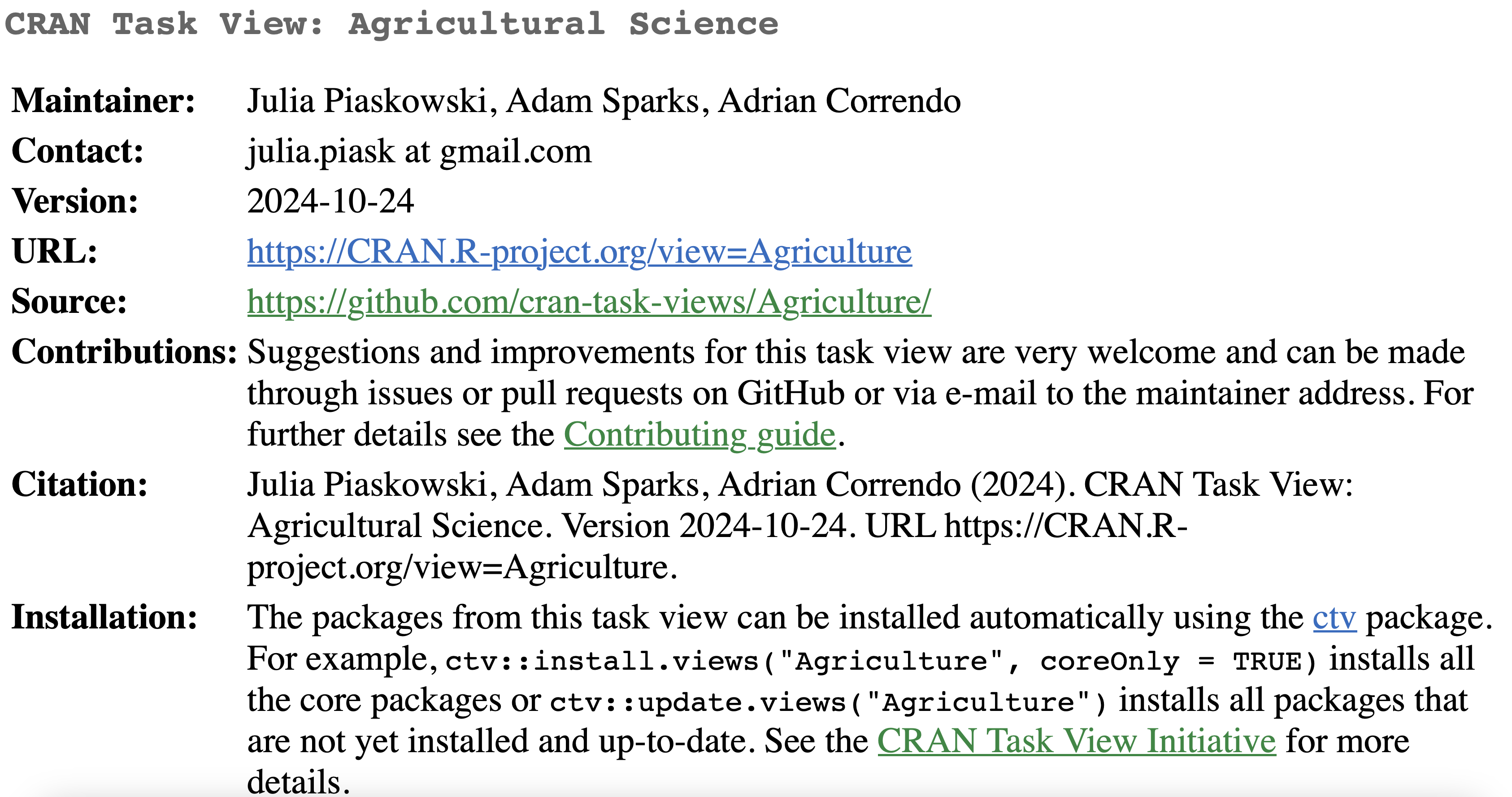
  • Definition: A CRAN Task View is a curated collection of R packages focused on a specific topic or area of research.
  • Purpose: Organizes packages into categories, making it easier for users to find the right tools for their work.
  • Topics: Ranges from โ€œMachine Learningโ€ to โ€œEcologyโ€ to โ€œTime Series Analysisโ€ and beyond.
  • Benefits:
    • Saves time for users by grouping relevant packages.
    • Regularly updated by experts in each field.
    • Offers a starting point for exploring specialized R tools.

Agriculture Task View

It compiles R packages useful for agricultural research and data analysis.

  • Content Includes:
    • Packages for analyzing crop and livestock data.
    • Tools for spatial analysis of agricultural data.
    • Resources for agricultural economics and statistical models.
  • Examples of Included Packages:
    • agricolae: Provides tools for analysis of experimental data in agriculture.
    • agridat: A collection of agricultural datasets for research and teaching.
  • Why Use It?
    • Simplifies the search for agricultural tools.
    • Helps researchers quickly identify relevant resources for their work.

Package from GitHub

A platform that allows developers to share packages with fewer restrictions, encouraging innovation and collaboration.

Pros ๐Ÿš€

  • Cutting-edge features and fast updates
  • Flexible release of experimental tools or features
  • Community-driven contributions and improvements

Cons โš ๏ธ

  • Less stability
  • Potential for bugs and security risks
  • Requires manual dependency management
  • Variable documentation quality

Bioconductor

A platform designed for bioinformatics and computational biology, providing tools for genomic and biomedical data.

Pros ๐Ÿš€

  • Tailored for Bioinformatics: Ideal for handling specialized data

THANK YOU!

acorrend@uoguelph.ca Adrian A. Correndo
Assistant Professor
Sustainable Cropping Systems
Department of Plant Agriculture
University of Guelph
Rm 226, Crop Science Bldg | Department of Plant Agriculture Ontario Agricultural College | University of Guelph | 50 Stone Rd E, Guelph, ON-N1G 2W1, Canada.

Contact me